Scrape emails from any websites
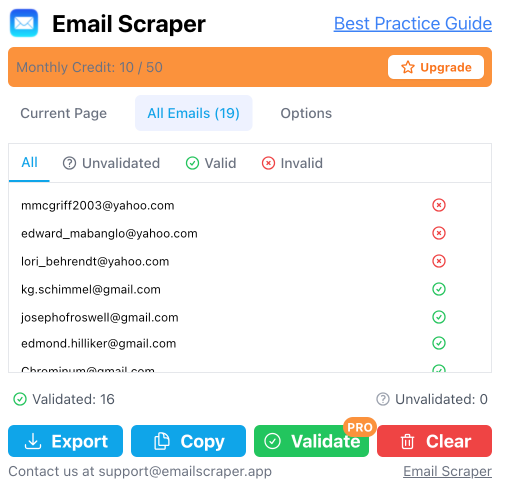
Scrape emails from any websites, and export them to a CSV file. It's quickly increase your email outreach.

4.9 / 5 Stars

Scrape emails from any websites

Feature

Step by step scrape emails from any websites

  • Step 1: Enter the url of your target website on google search
  • Step 2: Open the Email Scraper extension, you can see the scraped emails in the extension
  • Step 3: Validate the emails automatically
  • Step 4: Export the emails to a CSV file

Why use Email Scraper?

Save time by using the Email Scraper to automatically scrape emails in seconds.

Usecase of Email Scraper

Lead Generation

Extract business listing emails to generate sales leads, enhancing the customer database.

Data Automation

Automates data collection to streamline business operations and improve efficiency.

Choose Your Plan

Get started for free. No credit card required, cancel anytime.

Free

Get started

$0
  • Get 50 validated emails per month
  • Unlimited scraped emails
  • Unlimited export emails
  • CSV/Excel export

Pro

Monthly subscription

$9.8
  • Unlimited scraped emails
  • Unlimited export emails
  • Unlimited validated emails by one click (98% accuracy)
  • Scrape emails on scroll page New
  • CSV/Excel export
  • Priority support

100% money back guarantee.

We know you're gonna love our professional services, but let us prove it. If our service hasn't exceeded your expectations after 7 days, you'll get a full refund. Simple as that.

Frequently Asked Questions (FAQs)

Why do I need to validate emails?

We verify email addresses to ensure they are valid and deliverable. If an email is found to be unreachable, it will not be exported. Sending emails to unverified addresses increases the risk of landing in spam folders or bouncing, so validating emails is crucial for improving deliverability.

What is the difference between the Free and Pro versions?

The Free version has a limit of 50 validated emails per month, while the Pro version has unlimited validated emails.

Is my data protected with EmailScraper?

Absolutely, we do not store any of your data. We also do not share your data with anyone. Your data is only stored in your browser, ensuring your peace of mind.

How does Email Scraper work?

Email Scraper scrape source code of the website and extract emails from the source code.

Are email scraper legal?

Yes, email scraper is legal. It's a tool that helps you scrape emails from public websites.

How do I cancel my subscription?

You can cancel your premium subscription at any time. After you login the extension, you can click the "Manage Subscription" button to redirect to the subscription management page of Lemonsqueezy. If you have any questions about your subscription, please contact us at support@emailscraper.app .